
Many people first hear about TreasuryDirect when they want a safe place to buy government-backed investments. The signup process is not complicated, but it does have a few steps that are easy to misunderstand, especially if you have seen claims about opening a “Fed account.” The real path is TreasuryDirect, and once you know what to expect, the process is pretty straightforward.
Why TreasuryDirect Exists
A TreasuryDirect account is the official way for an individual to buy Treasury securities directly from the U.S. government. Whether you are looking to purchase T-Bills, Notes, Bonds, TIPS, or I Bonds, this platform allows you to manage these investments without needing a traditional brokerage account.
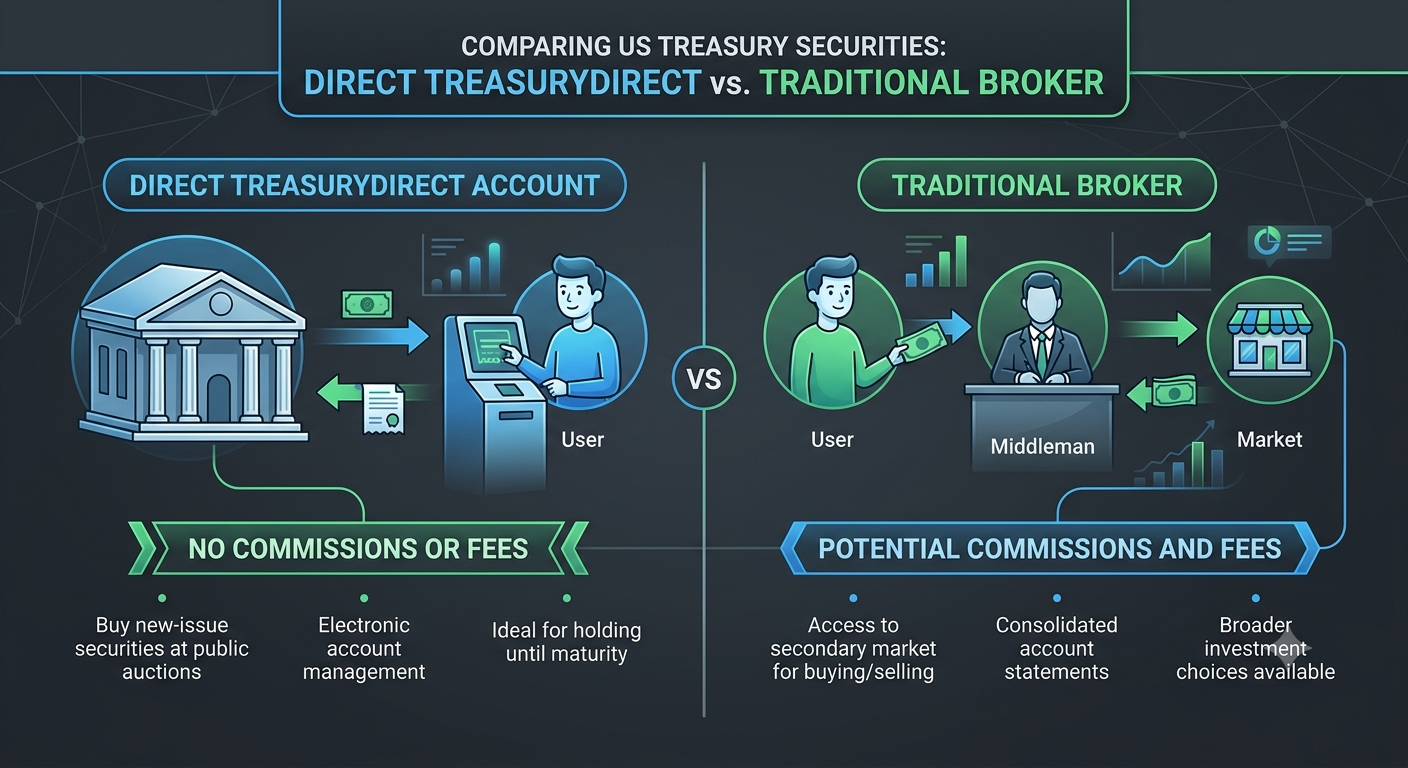
Why People Confuse it with a Fed Account
Important Security Warning
Be careful with any website or message claiming you have a “Federal Reserve account” tied to your Social Security number. That is not how the system works, and those claims are a common scam pattern. The real direct-purchase platform is TreasuryDirect, not the Federal Reserve. The Fed does not offer personal accounts to the public.
This distinction matters deeply because falling for the "Fed account" myth can expose you to identity theft and fraud.
What You Need Before Opening
Before you click “Apply Now,” ensure you have these items ready:
- Your Social Security number or EIN
- A valid U.S. address
- An email address
- A checking or savings account with routing and account numbers
TreasuryDirect uses this information to verify your identity and link the account to a bank account for purchases and payments. It also helps to use a private, stable browser session. TreasuryDirect warns users not to rely on normal browser navigation like back, forward, or refresh during the application because it can end the session. That warning is easy to overlook, but it matters because the account setup is highly security-sensitive.
The Three-Step Signup Flow
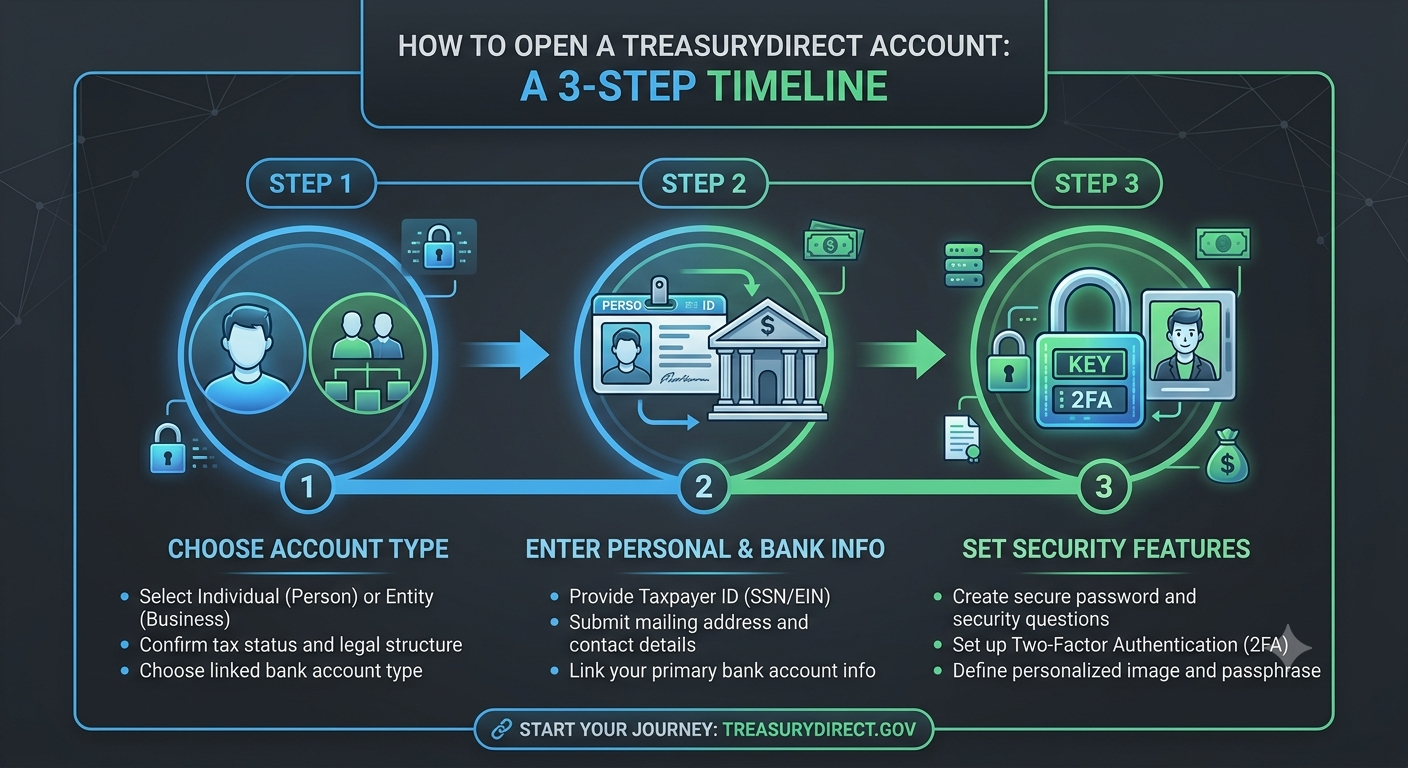
TreasuryDirect’s own setup flow shows that opening an account takes just three broad steps. In practice, the process feels a little more detailed because you need to enter identity and banking information carefully.
Step 1: Choose the Account Type
The first screen asks what kind of account you want to open. For most people, that means an individual account, but TreasuryDirect also supports entities, trusts, and other account types. If you are opening an account for a minor, the account is linked through a parent or guardian rather than opened as a standalone adult account. This step is more important than it looks, because the account type determines how ownership and future transactions are handled.
Step 2: Enter Personal and Bank Information
Next, TreasuryDirect asks for your personal details. This is the part that usually feels the most “official,” because the system is tying your identity to the Treasury account and to the bank account you will use for funding. TreasuryDirect is a government system, so the information is collected in a way that is designed to verify identity and reduce fraud, not just create a simple login. If the bank details are entered incorrectly, it can slow down future purchases or payments.
Step 3: Set Your Security Features
After the personal information step, TreasuryDirect has you create your security setup. The system may ask you to choose a personalized image and caption, a password, a password reminder, and security questions. These features are meant to help you recognize the real login page and protect against phishing.
What the Security Image/Caption Means
That personalized image and caption you choose in Step 3 are especially important because they act as a visual cue when you return to sign in later. In other words, if the image or caption looks wrong, that is a warning sign that something is off and you may be on a fraudulent site. This is one of the reasons TreasuryDirect feels more secure, but also a little less polished, than a normal bank app.
What Happens After Approval
Once the application is submitted, TreasuryDirect reviews and verifies the information. If the system can verify everything electronically, your account number is emailed to you. Some older guidance also notes that if online verification fails, you may be asked to complete an authorization form by mail.
After that, you can log in with your account number and password and start managing Treasury securities directly.